PS5 Homebrew: Engineering a Local Autoload Chain in Lua
Context: In the console security scene, a “Jailbreak” is rarely a single file. It’s usually a complex chain of vulnerabilities. When the PS5 Lua exploit (based on the Artemis game engine) was released, it was a raw developer tool: it opened a network port and waited for a PC to send code.
This is fine for researchers, but terrible for usability. I engineered a full “Plug-and-Play” automation layer: an Autoloader that removes the PC dependency, and a graphical User Interface powered by an embedded HTTP server.
Disclaimer: This project is strictly for Homebrew development. It allows developers to run their own unsigned code on their own hardware. It does not enable piracy.
Part 1: The Autoloader (The Backend)
The Problem: The “Network Dependency”
When a new console exploit drops, the workflow is usually manual and dependent on an external computer. The original tool, remote_lua_loader, was designed specifically for this use case: waiting for a developer to send payloads over the network.
For a user who just wants to run a specific payload, the process involved a tedious manual chain:
- User launches the vulnerable game on PS5.
- Screen goes black (Exploit active).
- User sends the Kernel Exploit (e.g.,
umtx.lua) via Python script. - User sends the ELF Loader once kernel access is achieved.
- User sends the binary payload via
socat.
I wanted an experience where you simply plug in a USB drive, launch the game, and the console automatically initializes the environment and loads your desired payloads.
The Solution: Modifying Execution Flow
I modified the exploit’s entry point (main.lua) to bypass the network listener loop. Instead of waiting for a PC, my fork immediately triggers a local autoload chain.
-- 1. Run the Kernel Exploit immediately from internal storage
load_and_run_lua(get_savedata_path() .. kernel_exploit_lua)

-- 2. Verify Jailbreak Status
if not is_jailbroken() then
    send_ps_notification("Jailbreak failed")
    return
end

-- 3. Handover control to my Autoloader
load_and_run_lua(get_savedata_path() .. "autoload.lua")
I wrote autoload.lua to act as a task runner. It scans USB ports (/mnt/usb0 - /mnt/usb7) for a config file (autoload.txt), parses it, and executes the defined payloads sequence. This allows users to construct complex load chains without modifying code.
Example autoload.txt:
# Initialize FTP server
ftpsrv.elf

# Wait for 500ms to ensure stability
!500

# Run custom script
hello_world.lua
Engineering Local Communication
The hardest engineering hurdle was loading binary (.elf) files. The Lua engine can’t execute binaries directly; it has to hand them off to a separate “ELF Loader” process waiting on port 9021.
Since I removed the PC, the PS5 had to send the file to itself.
I wrote an elf_sender class in Lua that mimics the behavior of socat using raw socket syscalls. It reads the file from USB and “uploads” it to 127.0.0.1:9021.
Crucially, because this uses localhost, it works even when the PS5 is offline. This allows users to disconnect their console from the internet (preventing auto-updates) while still using the full homebrew suite.
Part 2: PS5 Lua Menu (The Frontend)
Project Update: The
ps5_lua_menuproject has been archived. Active development has moved to the new ps5-payload-manager. Unlike the original menu, this successor runs as a native PS5 payload rather than being limited to Lua userland exploits, offering wider compatibility and improved features.
While the Autoloader solved the injection process, I realized users still needed a way to manage payloads interactively if they didn’t want to edit text files on a USB stick.
Technically, it might be possible to draw a UI using the game engine’s native functions, but rendering graphics while executing arbitrary Lua code proved unstable. I opted for a web-based approach.
The Hack: A Lua-powered HTTP Server
Instead of fighting the game engine’s rendering pipeline, I realized the PS5 has a hidden web browser. My solution?
- Write a Full HTTP Server in Lua running inside the game process.
- Use a proprietary system function (
sceSystemServiceLaunchWebBrowser) to open the internal browser. - Point the browser to
http://127.0.0.1:8084.
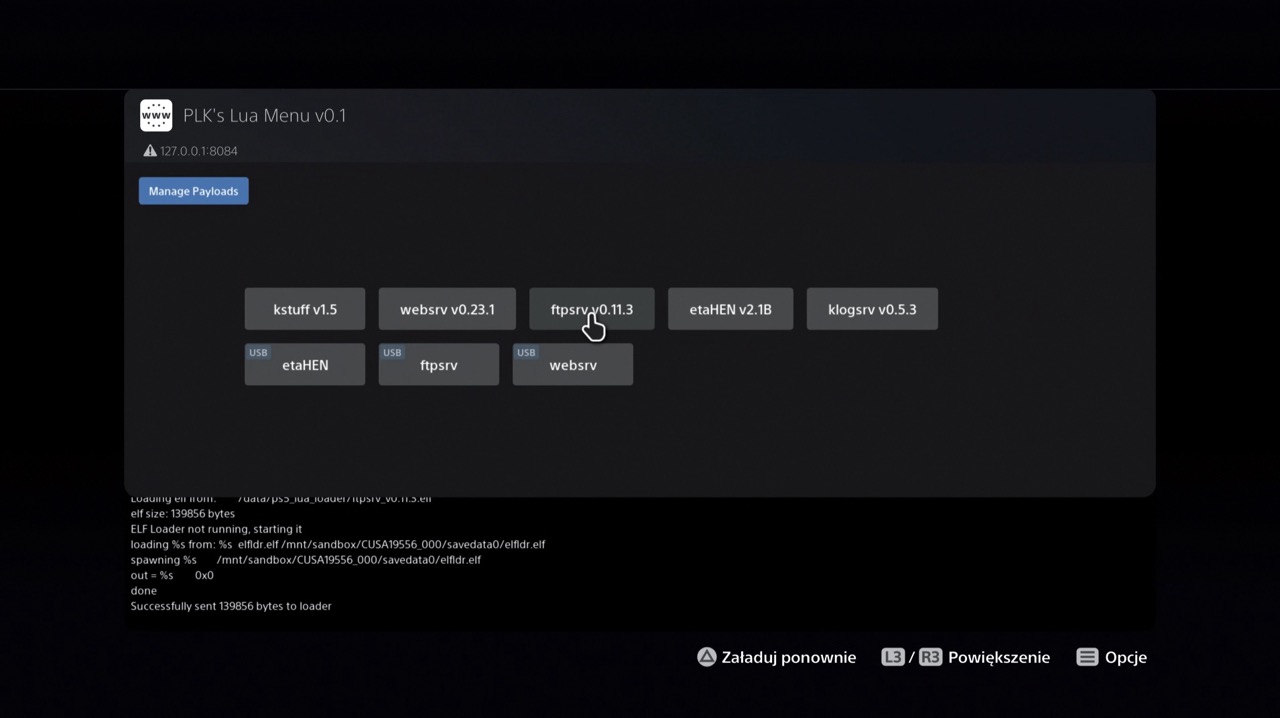 The result: The backend runs in Lua, but the frontend is a modern, responsive HTML5 interface running in the system browser.
Engineering the Server
Writing a web server in a restricted embedded Lua environment is… interesting. I had to handle TCP connections, parse HTTP headers, and serve multipart content manually.
-- A snippet of the Lua HTTP Server logic
function http_server.handle_request(request)
    local method, path = http_server.parse_request(request)

    if path == "/" then
        return HTML_CONTENT  -- Serving the embedded HTML string
    elseif path:match("^/loadpayload:") then
        -- Triggering payload execution from the UI
        local payload_path = path:match("^/loadpayload:(.*)")
        load_payload(payload_path)
        return "Payload loaded"
    end
end
Remote Management
Since the menu runs a web server, it isn’t limited to the console screen. I exposed a “Remote Manager” feature. The menu displays a QR code containing the PS5’s local IP address.
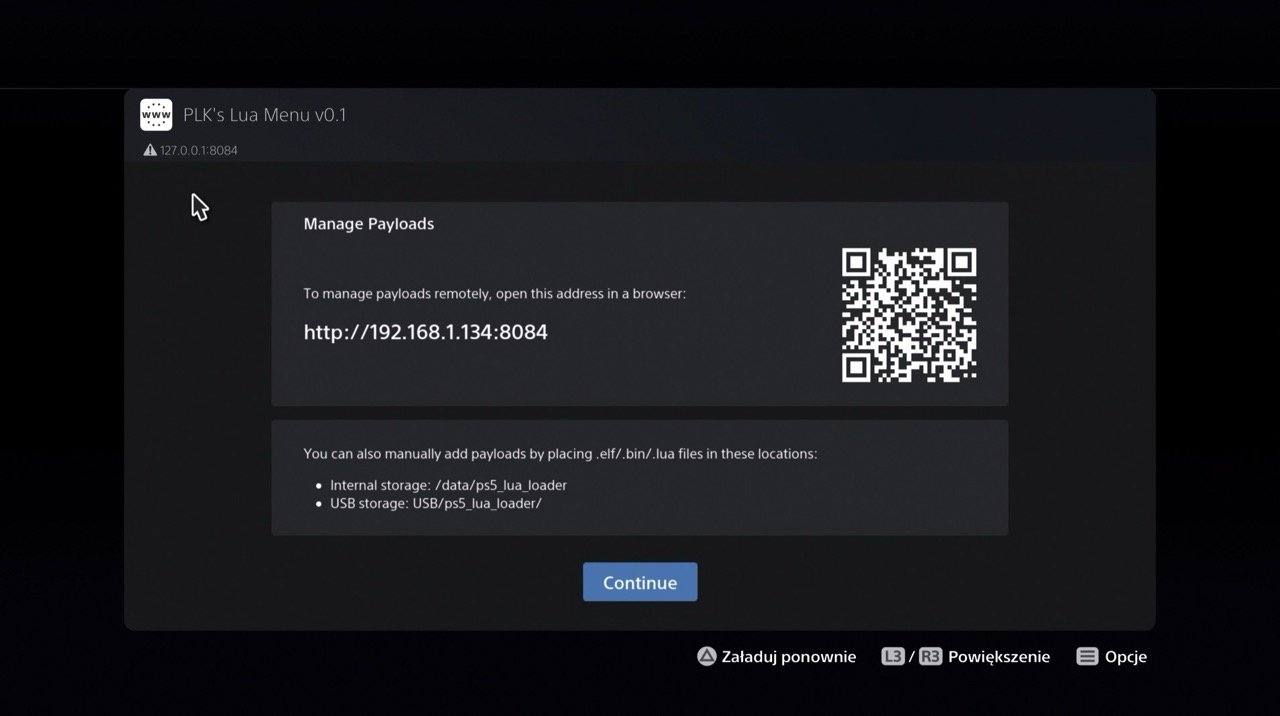
Scanning this allows the user to manage their console from a phone or laptop. They can upload new payloads (.elf or .lua files) directly to the console’s internal storage via the browser, completely bypassing the need for USB sticks or FTP clients.
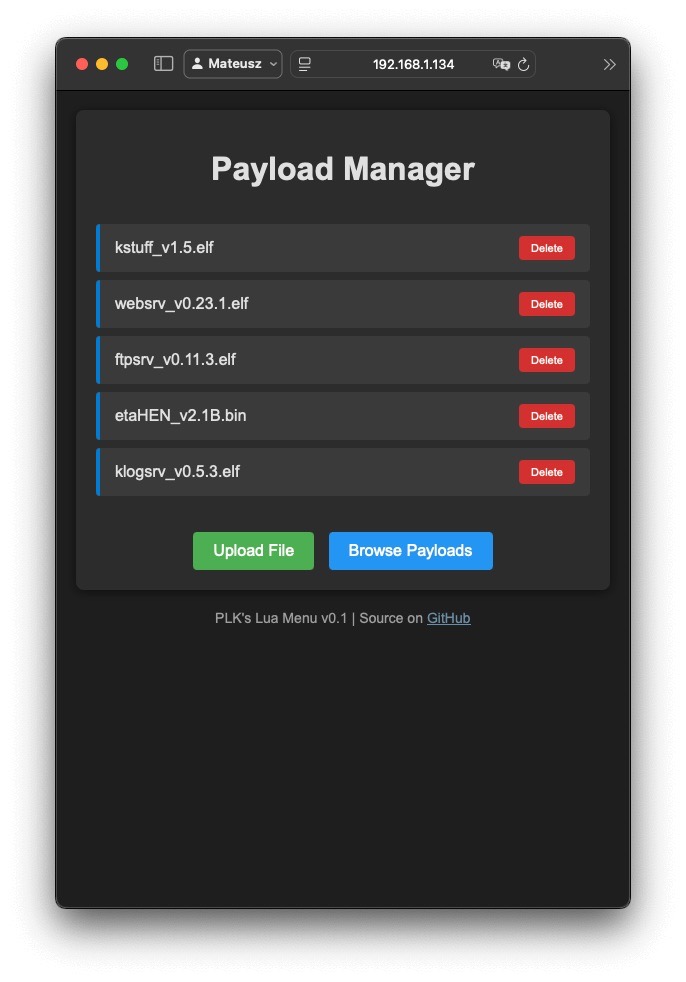 | 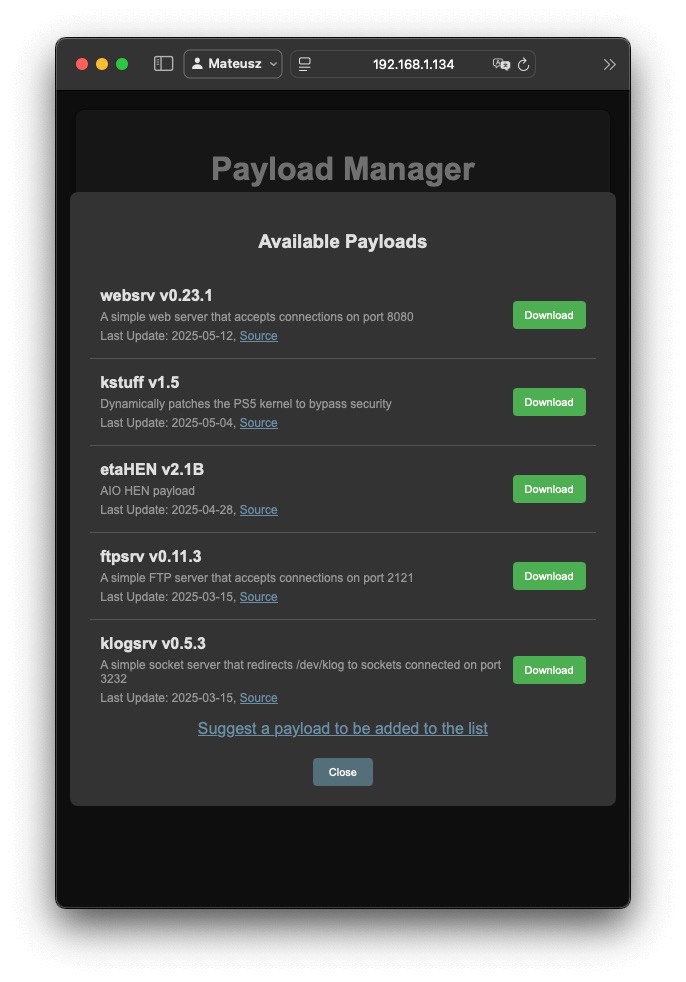 |
|---|---|
| Payload Manager interface | Payload Downloader |
Modular Build System
To keep development sane, I didn’t write this as one giant file. The project is modular (example files):
modules/httpserver.luamodules/elf_loader.luahtml/index.html
I wrote a Python build script that inlines the HTML/CSS/JS and concatenates the Lua modules into a single ps5_lua_menu.lua file that is easy for users to deploy.
Conclusion
This project was about taking a raw security vulnerability and wrapping it in layers of “User Experience” engineering. By building a custom autoloader and a web-based GUI environment entirely within the constraints of a game engine, I turned a developer-only exploit into a comprehensive payload injection ecosystem.
ps5_lua_autoloader (GitHub)
ps5-payload-manager (GitHub) (Successor to ps5_lua_menu)