Carbon for F1TV: Real-Time Sync Engine for Multi-Window Playback
Context: F1TV is the official streaming service for Formula 1. While the content is great, the web player lacked a crucial feature for data nerds: Multi-View (watching the Main Feed + Driver Tracker + Onboard Cameras simultaneously).
Existing third-party tools relied on extracting stream URLs for external players, but this approach broke when F1TV implemented Widevine DRM. I engineered a solution that respects these security constraints while delivering a synchronized “Command Center” experience directly in the browser.
The Engineering Challenge: Synchronizing Encrypted Streams
Formula 1 is a data-heavy sport. Watching just the main broadcast misses half the story. I wanted to monitor the race, the “Driver Tracker” map, and specific onboard cameras simultaneously.
However, synchronizing three separate browser windows manually is impossible. If one stream buffers for 2 seconds, the map becomes useless because it shows the car’s position in the future relative to the video.
The technical constraint was strict: Widevine DRM. Traditional solutions tried to extract the raw stream URL to play it in VLC or Electron. This is brittle and often violates the platform’s terms. I needed a way to synchronize playback without touching the encrypted stream data or decryption keys.
The Solution: Orchestration over Extraction
Instead of fighting the platform’s security, I decided to build an orchestration layer on top of it.
I built Carbon for F1TV, a browser extension that operates within the authorized F1TV session. It allows users to spawn “Child Windows” (Popouts) that automatically synchronize their playback with the “Master Window.”
Since the extension runs inside the official web player, the browser handles the DRM decryption natively. My code simply acts as a conductor, ensuring all windows play at the exact same timestamp.
Carbon For F1TV in action.Technical Deep Dive
1. The “Popout” Architecture
The core challenge was Cross-Window Communication. How does Window A tell Window B to “seek to 10:45”?
I utilized window.open to spawn the secondary streams. Crucially, I maintained a reference to the child window objects, creating a “Master/Slave” relationship entirely on the client side.
// The Master Window keeps a registry of all child windows
const popouts = [];

function addPopout() {
  // ... ID generation logic

  // Open the same URL but with a specific hash trigger
  let popoutUrl = document.location.href + "#carbon_popout";

  // Store the reference to allow Direct DOM Manipulation via Same-Origin Policy
  popouts["popout-" + id] = window.open(popoutUrl, createTime, "width=1280,height=720");
}
Because both windows share the same origin (f1tv.formula1.com), the browser’s security model allows the Master window to read and write properties in the Child window’s DOM directly. This eliminated the need for complex WebSocket relays—I could simply read the state of one window and apply it to another.
2. The Sync Engine (PID-based Control Loop)
The naive approach to synchronization is to constantly force the Child window’s time to match the Master:
childVideo.currentTime = masterVideo.currentTime
This creates a terrible user experience.
- Audio Stuttering: Constant seeking causes the audio to chop.
- Buffering Loops: Seeking forces the player to flush its buffer, causing stalls.
I engineered a smoother solution using Playback Rate Modulation. Instead of jumping time, the engine calculates the drift and slightly adjusts the playback speed to nudge the video back into sync. It acts effectively as a Proportional Controller.
Here is the logic I implemented to handle the drift:
// Calculate how far behind/ahead the child is (in seconds)
let diffToTarget = targetProgress - thisProgressRealtime;
let diffToTargetAbs = Math.abs(diffToTarget);

// CASE 1: Massive desync (>15s) -> Hard Jump required (Network lag)
if (diffToTargetAbs > 15) {
    videoSyncJumpToProgress(targetProgress);
}
// CASE 2: Large drift -> Fast Catch-up (3x speed)
else if (diffToTargetAbs > 10) {
    videoSpeed(diffToTarget > 0 ? 3 : 0.333);
}
// CASE 3: Micro-adjustments -> Subtle speed changes
// This prevents the "chipmunk effect" while maintaining sync
else if (diffToTargetAbs > 0.2) {
    if (diffToTarget > 0) { videoSpeed(1.11); } else { videoSpeed(0.9); }
}
// CASE 4: Perfect Sync -> Normal Speed
else {
    videoSpeed(1);
}
This ensures that if a stream lags by 1 second, it gently speeds up to 1.11x for a few seconds until it catches up, providing a seamless visual experience.
3. Injecting into a React SPA
F1TV is a Single Page Application (React). This means the page doesn’t reload when you navigate from the Menu to a Video; only the DOM changes.
Standard window.onload scripts fail here because the video player element (.bitmovinplayer-container) doesn’t exist when the site first loads.
I used a MutationObserver to watch the <body> for changes and detect virtual “page navigations” by tracking the URL history.
let oldHref = document.location.href;
let observer = new MutationObserver(function (mutations) {
  mutations.forEach(function (mutation) {
    if (oldHref != document.location.href) {
      oldHref = document.location.href;
      pageChanged(); // Trigger re-injection logic
    }
  });
});

observer.observe(document.querySelector("body"), {
  childList: true,
  subtree: true
});
Even with the observer, React renders asynchronously. I implemented a safe polling mechanism (setInterval) that checks for the player’s existence every 50ms before attempting to inject the custom UI controls.
4. Native UI Integration
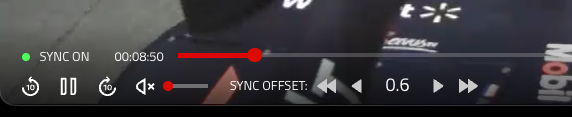
To ensure a seamless experience, I reverse-engineered the CSS classes of the video player to inject my control buttons (Popout, Theater Mode, Sync Toggle) directly into the native control bar.
This required inspecting obfuscated class names (e.g., .bmpui-ui-volumeslider) and inserting my DOM nodes relative to them, making the extension feel like a native feature of the platform.
Conclusion
Carbon for F1TV demonstrates that you don’t need to break a system to improve it. By working within the architectural and security constraints of the platform, I built a robust tool that solved a complex synchronization problem without compromising the DRM protection of the content.
It highlights the power of the DOM API: with simple tools like window.open references and playbackRate, we can build complex multi-window orchestration systems entirely in the browser.