Why I Built a Custom ERP in Native PHP (Scaling a Solo E-commerce Business)
Context: In the e-commerce world, the standard advice is “Don’t reinvent the wheel—use Shopify or BaseLinker.”
I ignored that advice. I run a personalized manufacturing business (printing custom t-shirts and mugs) as a one-man operation. When you are working alone, you don’t need “enterprise features”—you need a force multiplier. Here is how I built “Monmat Manager,” a proprietary ERP that allows me to process hundreds of orders solo.
The “Buy vs. Build” Calculation
When I started scaling my t-shirt business on Allegro (Poland’s largest marketplace), I hit a wall with off-the-shelf solutions.
- WooCommerce/PrestaShop: Too slow. The database overhead for a simple order list was massive.
- BaseLinker: Great tool, but expensive and “closed.” It couldn’t handle my specific requirement: Automatically extracting the specific design ID from the offer description and rendering a preview directly on the packing list.
I needed a system that could:
- Ingest orders from Allegro instantly.
- Extract internal “Project IDs” hidden in the offer descriptions (for thousands of pre-defined designs).
- Parse customer messages for custom IDs (added later for the mug configurator).
- Process Shipping Labels intelligently (the hardest part).
So I built it myself. In Native PHP.
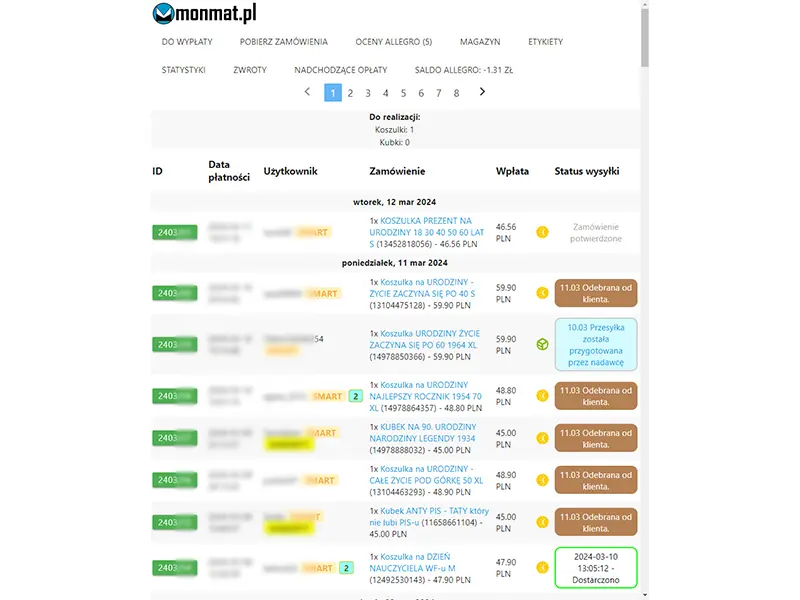
Architecture: Simplicity over Abstraction
I chose Native PHP (no Laravel/Symfony) not because frameworks are bad, but because my requirements were specific and my resources were limited.
- Lightweight Footprint: Compared to the heavy CMS platforms I was migrating from (PrestaShop), a raw PHP script is blazing fast. It executes immediately without the overhead of booting a massive core for every request, which was crucial on the budget VPS I was using at the time.
- The “2018 Factor”: Honesty time—when I started this project, I didn’t know frameworks existed. I was a self-taught guy building my first real backend.
I didn’t use a router because I didn’t know what a router was. I built everything from scratch. In hindsight, this “ignorance” was a blessing. It forced me to understand the fundamentals of HTTP, SQL injection, and memory management that framework users often take for granted.
- Backend: Native PHP 7.4+ (Procedural/Object-Oriented mix).
- Database: MySQL.
- Tools:
ImageMagick,Poppler-utils(pdftotext),ZBar,Tesseract.
Surviving the API Apocalypse: SOAP to REST
One of the biggest engineering challenges wasn’t building the features, but keeping them alive.
When I started, Allegro relied on a heavy, XML-based SOAP API (WebAPI). It was cumbersome, but it worked. As Allegro began their multi-year migration to REST, I had to engineer a Hybrid Adapter.
For a long time, the new REST API was incomplete—it could fetch orders, but couldn’t handle specific logistics tasks. My system had to fetch the order via REST (JSON) but use a legacy SoapClient connection to fetch the missing details (XML), merging the data objects on the fly.
Eventually, I deprecated the SOAP layer entirely. This experience taught me that software isn’t static—if you build on a third-party platform, you must be ready to rewrite your core engine when the vendor changes the rules.
The Ingestion Engine: No Frameworks, Just Logic
To keep the system fast and simple, I wrote my own lightweight wrappers around file_get_contents using stream_context_create to handle the Allegro REST API.
The beauty of a custom solution is that I can hardcode my business logic directly into the ingestion script. My business relies on identifying thousands of distinct T-shirt designs. I embed an internal ID at the very bottom of the Allegro offer description.
Instead of maintaining a separate database mapping Allegro IDs to my SKUs, I just scrape my own offers on ingestion:
// Ingesting the offer details
$allegroofferdetails = getOfferFields($access_token, $cfitem->offer->id);

// Extracting my internal Project ID hidden in the last section of the description
$lastSection = end($allegroofferdetails->description->sections);
$rawId = $lastSection->items[0]->content;

// Cleaning up the HTML markers to get the clean ID (e.g., "TSHIRT_001")
$projectId = str_replace(["<p>// ", "</p>"], "", $rawId);

// Now I know exactly what to print without looking it up manually
$itemdetails["naszid"] = $projectId;
This logic allows the ERP to identify exactly which design to print (e.g. TSHIRT_001) directly from the live order data. I don’t need to maintain a separate database table mapping ephemeral Allegro Offer IDs to my internal product files—the mapping lives right in the offer description.
Inventory Logic: The Append-Only Ledger
Most simple shop scripts handle stock by overwriting a number: UPDATE products SET stock = stock - 1.
This is dangerous. If the number is wrong, you never know why.
I implemented a simplified Event Sourcing pattern. I never just “update” the stock count. Instead, I insert a transaction log for every movement.
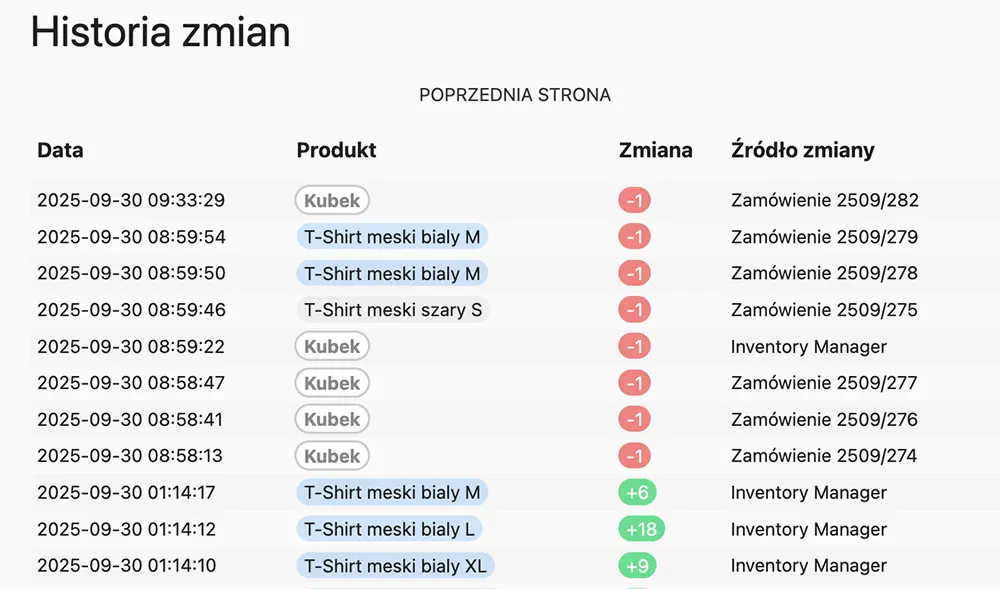
This logic allows me to track exactly why an item left the shelf (e.g., linked to specific orderid). I also enforce strict “Brute Force” sanitization on all inputs to ensure data integrity.
// inventorychange.php

// 1. Strict Manual Validation
// Allow only alphanumeric characters and specific safe symbols
if (!ctype_alnum(str_replace(array("_", "-", " ", ":", "(", ")", "[", "]", ".", ",", "+", "|"), "", $item))) {
    $status["errors"][] = "invalid item name";
    exit();
}

// 2. Calculate State based on History
$oldstock = inventoryGetItemStock($item);
$newstock = $oldstock + intval($value);

// 3. Log the Movement (INSERT, don't UPDATE)
$sql = "INSERT INTO inventory (`item`,`value`,`stock`,`origin`,`orderid`,`state`)
        VALUES ('".mysqli_real_escape_string($link,$item)."', ...)";
The Intelligent Dashboard
The dashboard isn’t just a list of rows; it’s a Decision Engine.
When you process hundreds of orders alone, you can’t waste mental energy deciding “Do I ship this today?” or “Does this fit in a small locker?”. I hardcoded these heuristics directly into the PHP view logic.
1. Algorithmic Shipping Deadlines The system checks the payment time and the calendar to tell me exactly when the package must leave.
if (strtotime($order->paymentdate) < strtotime(date("Y-m-d") . " 12:00:00")) {
  if (isWorkingDay(today()) && !isHoliday(today())) {
    $shippingDate = "TODAY";
  } else {
    $shippingDate = nextWorkingDay();
  }
}
2. Physical Constraints Detection (The “Gabaryt” Check) Shipping mugs in InPost Paczkomaty requires a Size B locker (Size A is too flat). Mistakes here are costly. The system automatically greps the order items for keywords and forces a visual alert if the package requires a larger locker.
if (strpos(strtolower($order->items), 'kubek') !== false) {
  if (strpos($order->shippingmethodname, "Paczkomaty") !== false) {
    echo '<span class="badge-gabaryt">GABARYT</span>'; // Visual Alert: Use Locker B!
  }
}
This simple if statement saves me from standing in front of a locker with a box that doesn’t fit.
The “Killer Feature”: Reverse Engineering PDF Labels
The biggest bottleneck in e-commerce isn’t packing—it’s managing shipping labels. Carriers (InPost, DPD, UPS, DHL, Orlen) often generate labels in “Bulk PDFs”—one file containing 50 different labels.
Finding the specific label for “Order #123” inside a 50-page PDF is a nightmare. Most systems rely on direct API integrations to fetch labels one by one, but that creates a massive maintenance burden. New carriers appear constantly, and clients often request last-minute address changes that are painful to handle via API.
My solution? I built a PDF Decompiler.
I prefer to generate labels manually on the carrier’s dashboard (or Allegro’s multi-carrier panel) where I can easily handle edge cases. I simply download the resulting Bulk PDF and upload it to my system. My code then splits it, analyzes it, and sorts out the chaos, decoupling my logic from specific carrier implementations.
The Logic (PHP + Bash)
- Split: Use
FPDIto break the 50-page PDF into 50 single files. - Render: Use
ImageMagickto convert the PDF to a high-res PNG. - Read: Pipe the PNG into
zbarimg(to read QR/Barcodes) orpdftotext(to extract raw strings). - Map: Rename the file to
[TrackingNumber].pdf.
With the recent introduction of Allegro Delivery, the labels changed format. The barcode was no longer the tracking number I needed. OCR (Optical Character Recognition) can be unreliable for small text, so I switched to direct text extraction. Since PDF is a vector format, pdftotext yields 100% reliable results by reading the text layer directly.
// 1. Convert PDF page to PNG for visual analysis
$image = new imagick();
$image->setResolution(200,200);
$image->readImage($file.'[0]');
$image->setImageFormat('png');
$image->writeImage("splitted/tmp/" . $pngfilename);

// 2. Read the Barcode/QR Code directly from the image
$barcode = shell_exec("zbarimg --raw -q splitted/tmp/" . $pngfilename);

// 3. Handle Carrier Specifics (InPost vs DPD vs DHL vs Allegro Delivery)
if (strlen($barcode) == 28) {
    // DPD Logic: Extract hidden barcode
    $barcode = substr($barcode, 8, -6);

} else if (strlen($barcode) == 56) {
    // DHL / Allegro Delivery Logic
    // The barcode here is internal. The real tracking number is in the text.
    // We bypass OCR and extract the raw text layer for 100% reliability.

    $txtfilename = str_replace(".pdf", ".txt", basename($file));
    shell_exec("pdftotext -raw " . $file . " splitted/tmp/" . $txtfilename);

    $textdata = file_get_contents("splitted/tmp/" . $txtfilename);

    // Parse the text file for the specific line
    // e.g., finding "Nr Allegro : [TRACKING_NUMBER]"
    if (preg_match('/Nr Allegro : (.*)/', $textdata, $matches)) {
        $barcode = trim($matches[1]);
    }
}

// 4. Save the identified label
rename($file, "pdf/" . $barcode . "_" . uniqid() . ".pdf");
This hybrid approach handles every edge case: DPD’s weird barcode padding, UPS’s OCR requirements, and Allegro Delivery’s specific text formatting.
The Solo Workflow: “Scan-to-Print”
Because the system has already identified and indexed every label, the packing process is seamless.
- I print a physical A4 Order Summary page for every order, which includes a QR Code containing the Order ID.
- I pack the order using this sheet.
- I scan the QR Code on the paper sheet.
- The system instantly identifies the order, calculates which tracking number belongs to it, and opens a popup with the pre-processed label PDF.
- It automatically triggers the browser’s print dialog via JavaScript.
I don’t need to hunt for files. The system puts the correct label right in front of me, and since the print dialog takes focus, I just hit “Enter” (or Space) to confirm. It turns a multi-step search process into a single keystroke.
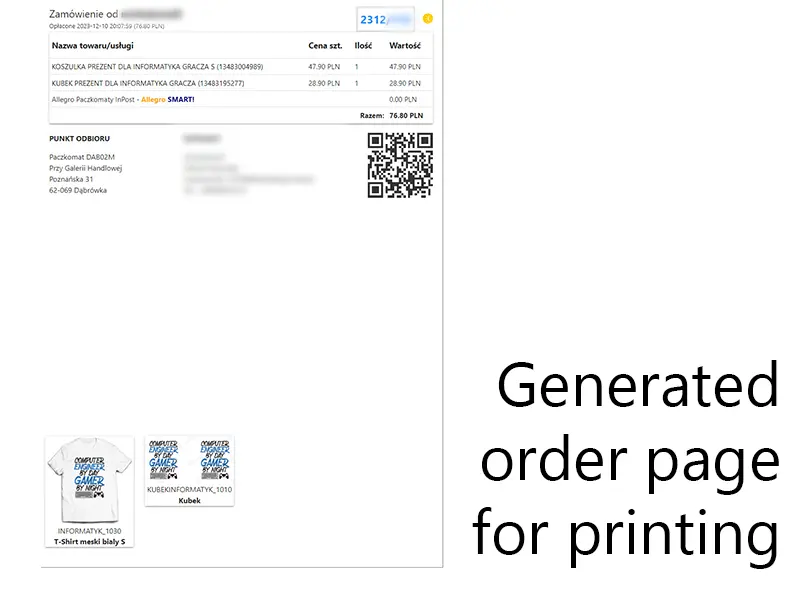
Automating the “Un-automatable”
While I handle standard orders using the description scraping method mentioned above, the system had to evolve when I introduced the Custom Mug Configurator (iCUP.pl).
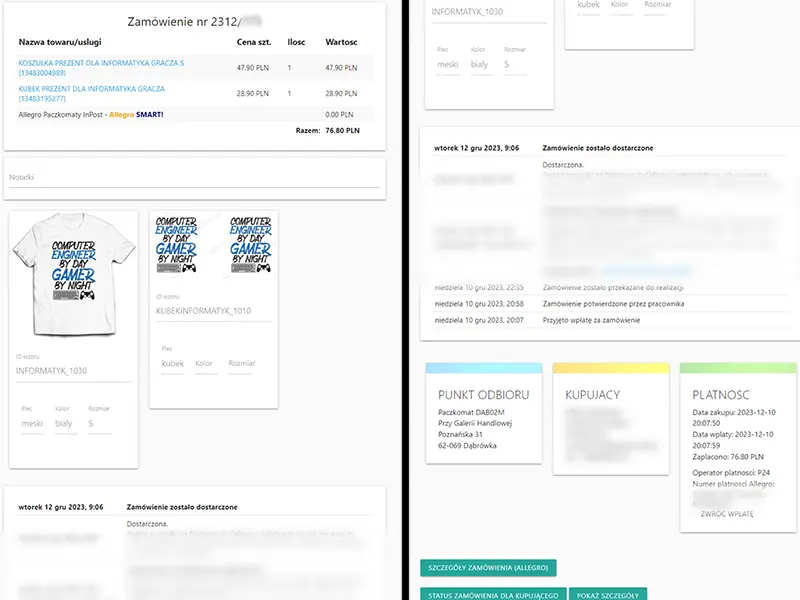
For these items, the Project ID isn’t in the description—it’s generated by the user. Monmat Manager scans two sources to link the design:
- The
messageToSeller: If the user pasted the ID during checkout. - Internal
notes: If I manually pasted the ID later (e.g., from an email).
The system uses a specific Regex pattern (/(?<=\W|^)\d{6}[a-zA-Z0-9]{13}(?=\W|$)/g) to find these IDs. If found, it presents an “Uzupełnij numery ICUP” button, which downloads the high-res print file and attaches it to the order item, treating a custom one-off product exactly like a standard stock item in the workflow.
“Accidental” Architecture
Looking back at the project structure today, I realized that I intuitively built a decoupled architecture before I even knew what “API-First” or “MVC” really meant.
I separated the logic into distinct layers:
api/: The engine room. These scripts (addtodatabase.php,inventorychange.php,getneworders.php) handle all the heavy lifting—database interactions, Allegro API calls, and business logic. They return raw data (JSON).manager/: The frontend. This folder contains the views and the interface logic that consumes the API.auth/: A dedicated module for handling authentication state.
Legacy Code & Platform Compliance
One of the realities of building on top of marketplaces like Allegro is that their rules change, and your code must adapt.
For years, Monmat Manager used a Mailgun integration to send branded “Order Processing” emails. It was a great feature that improved customer satisfaction.
However, in 2022, Allegro updated their Terms of Service to forbid communicating with buyers outside of their ecosystem. As a responsible engineer, I didn’t try to look for loopholes like spamming SMS or abusing the API. I killed the feature.
<?php
exit();
/* 2022-10-04 emaile notify wylaczone, bo nie wolno (emails disabled due to ToS)
   [https://allegro.pl/dla-sprzedajacych/jakosc-sprzedazy/powielanie-komunikacji](https://allegro.pl/dla-sprzedajacych/jakosc-sprzedazy/powielanie-komunikacji)

   // ... Original Mailgun cURL logic below ...
   $ch = curl_init();
   curl_setopt($ch, CURLOPT_URL, '[https://api.eu.mailgun.net/v3/mg.monmat.pl/messages](https://api.eu.mailgun.net/v3/mg.monmat.pl/messages)');
   // ...
*/
?>
The code remains in the codebase as a testament to what was once possible, but the exit() at the top serves as a permanent compliance guardrail.
Conclusion
Building a custom ERP requires maintenance, but the control is absolute. “Monmat Manager” isn’t just software; it’s a force multiplier that allows one person to do the work of a logistics team.
By bridging the gap between digital APIs (Allegro) and physical workflows (shipping labels, printers), I turned a chaotic process into a streamlined system. It proves that sometimes, the best business decision isn’t to buy the standard tool, but to engineer the exact tool you need.